MCP( 模型上下文协议 Model Context Protocol)
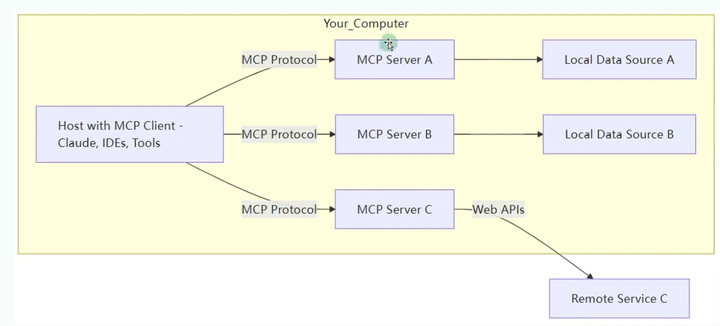
模型上下文协议(Model Context Protocol,简称MCP)是一种创新的开放标准协议,旨在解决大语言模型(LLM)与外部数据和工具之间的连接问题。 它为AI应用提供了一种统一、标准化的方式来访问和处理实时数据,使模型不再局限于训练时获得的静态知识。
MCP由Anthropic首次提出并开源,通过定义标准化接口,允许大语言模型以一致的方式与各类外部系统互动,包括数据库、API和企业内部工具等。 这一协议的核心价值在于打破了AI模型的"信息孤岛"限制,极大扩展了大模型的应用场景.
架构
https://modelcontextprotocol.io/specification/2025-11-25/architecture
MCP 由三个核心组件构成:Host、Client 和 Server。
假设你正在使用 Claude Desktop (Host) 询问:“我桌面上有哪些文档?”

- Host:Claude Desktop 作为 Host,负责接收你的提问并与 Claude 模型交互。
- Client:当 Claude 模型决定需要访问你的文件系统时,Host 中内置的 MCP Client 会被激活。这个 Client 负责与适当的 MCP Server 建立连接。
- Server:文件系统 MCP Server 会被调用。它负责执行实际的文件扫描操作,访问你的桌面目录,并返回找到的文档列表。
生命周期
https://modelcontextprotocol.io/specification/2025-11-25/basic/lifecycle
案例流程
JSON-RPC
JSON-RPC 2.0是一种基于JSON(JavaScript Object Notation)的远程过程调用(RPC)协议。它是一种轻量级的、无状态的、跨语言的通信协议,常用于客户端与服务端之间的交互。
MCP 协议使用 JSON-RPC 2.0 作为消息传输格式.
MCP 支持两种标准传输方式:标准输入/输出(stdio) 和 Streamable HTTP(替代 HTTP+SSE transport from protocol version 2024-11-05) 。
2024-11-05版本采用的HTTP+SSE双通道方案存在三大结构性缺陷:
| 问题类型 | 具体表现 | 技术后果 | |:——-:|:—-:|::| | 连接管理复杂 | 需维护POST请求端与SSE事件流双通道 | 客户端需实现双重连接保活机制 | | 断线恢复困难 | SSE流中断后需重新建立完整会话 | 长任务场景可能丢失上下文数据 | | 断线恢复困难 | 简单请求被迫使用流式传输 | 额外30%的网络资源消耗(基于MCP工作组基准测试) |
消息格式
在JSON-RPC 2.0中,有以下三种主要的消息类型:
- 请求对象(Request Object)
// 结构如下
{
  "jsonrpc": "2.0",
  "method": "methodName",
  "params": ["param1", "param2"],
  "id": 1
}

//示例:
{
  "jsonrpc": "2.0",
  "method": "add",
  "params": [4, 5],
  "id": 123
}
- 响应对象(Response Object)
// 成功
{
  "jsonrpc": "2.0",
  "result": 9,
  "id": 123
}
// 错误
{
  "jsonrpc": "2.0",
  "error": {
    "code": -32600,
    "message": "Invalid Request",
    "data": "Additional information if available"
  },
  "id": null
}
- 通知对象(Notification Object):是一种特殊的请求,不需要响应。用于不关心结果的场景,例如日志记录等。
{
  "jsonrpc": "2.0",
  "method": "logMessage",
  "params": ["User logged in"]
}
服务端特性
https://modelcontextprotocol.io/specification/2025-11-25/server
Tools 工具

Resources 资源
Resources(资源)是 MCP 协议中的核心原语之一,服务器通过它可以向客户端提供可读的数据或内容,用作 LLM 交互的上下文信息。
Prompts 提示词
提示词 允许服务器定义可复用的提示词模板和工作流,客户端可以轻松将这些模板呈现给用户或 LLM。
客户端端特性
MCP 的两种认证模式:API 密钥 vs OAuth 2.1
1. API 密钥:适合简单场景的"快速方案"
2. OAuth 2.1:生产环境的"标准方案"
MCP 授权的核心是标准的 OAuth 2.1 流程,通常涉及三个角色:MCP 客户端(比如本地 LLM 应用 Claude Desktop)、OAuth 服务器(比如 WorkOS)、MCP 服务器(比如处理 GitHub 议题的服务、Playwright UI 测试服务)
完整流程拆解(以"创建 GitHub 议题"为例):

- 用户通过 MCP 客户端,尝试访问需要对接 MCP 服务器的功能(比如创建 GitHub 议题)。
- 客户端打开浏览器,将用户重定向到 OAuth 服务器(比如 WorkOS)。
- 用户完成登录,并授权客户端访问自己的账户。
- OAuth 服务器向客户端返回一个授权码。
- 客户端用这个授权码,换取访问令牌(Access Token)。
- 客户端携带访问令牌,向 MCP 服务器发起请求。
大多数 MCP 客户端是"公网客户端"(比如桌面应用、移动端应用),没法安全存储密钥——一旦打包在应用里,就有可能被提取出来。这时

- 客户端发起授权流程时,生成一个随机字符串(称为"代码验证器"),并对其进行哈希处理,得到"代码挑战"。
- 客户端在初始的授权请求中,将"代码挑战"发送给 OAuth 服务器。
- 后续用授权码换令牌时,客户端必须提交原始的"代码验证器"。
让客户端"自动读懂"服务器的安全规则
客户端知道 MCP 服务器的 URL 后,还需要搞清楚:服务器接受哪种令牌格式?信任哪些授权服务器?有哪些可用的权限范围?
如果手动配置这些信息,不仅麻烦还容易出错。MCP 采用了标准化的元数据发现方案,让服务器主动暴露这些配置,客户端自动读取适配。
https://modelcontextprotocol.io/seps/985-align-oauth-20-protected-resource-metadata-with-rf
- 受保护资源元数据(MCP 服务器的"安全指南")
/.well-known/oauth-protected-resource
- 授权服务器元数据(OAuth 服务器的"通信手册")
/.well-known/oauth-authorization-server
案例
手动开发 MCP 开发
使用 jsonrpc 协议编写 tools
// hello-mcp-server.go
package main
import (
"bufio"
"encoding/json"
"fmt"
"log"
"os"
)
// 定义通用的请求和响应结构体,以匹配MCP的JSON-RPC格式
type Request struct {
JSONRPC string `json:"jsonrpc"`
ID any `json:"id"`
Method string `json:"method"`
Params json.RawMessage `json:"params"`
}
type Response struct {
JSONRPC string `json:"jsonrpc"`
ID any `json:"id"`
Result any `json:"result,omitempty"`
Error *Error `json:"error,omitempty"`
}
type Error struct {
Code int `json:"code"`
Message string `json:"message"`
}
func main() {
// MCP服务器通过标准输入/输出进行通信,所以我们需要一个扫描器来读取stdin
scanner := bufio.NewScanner(os.Stdin)
for scanner.Scan() {
line := scanner.Bytes()
// 读取每一行(通常是一个JSON-RPC请求),并尝试解析
var req Request
if err := json.Unmarshal(line, &req); err != nil {
log.Printf("Error unmarshaling request: %v", err)
continue
}
// 根据请求的Method字段,路由到不同的处理函数
switch req.Method {
case "initialize":
handleInitialize(req)
case "tools/list":
handleToolsList(req)
case "tools/call":
handleToolCall(req)
case "notifications/initialized":
// 客户端发送的初始化完成通知,无需响应
continue
default:
sendError(req.ID, -32601, "Method not found")
}
}
}
// handleInitialize负责向Claude Code"自我介绍"
func handleInitialize(req Request) {
// 符合MCP协议的initialize响应
initializeResult := map[string]any{
"protocolVersion": "2024-11-05", // MCP协议版本
"capabilities": map[string]any{
"tools": map[string]any{}, // 声明支持工具能力
},
"serverInfo": map[string]any{
"name": "hello-server",
"version": "1.0.0",
},
}
sendResult(req.ID, initializeResult)
}
// handleToolsList返回可用工具列表
func handleToolsList(req Request) {
toolsListResult := map[string]any{
"tools": []map[string]any{
{
"name": "greet",
"description": "A simple tool that returns a greeting.",
"inputSchema": map[string]any{
"type": "object",
"properties": map[string]any{
"name": map[string]any{
"type": "string",
"description": "The name of the person to greet.",
},
},
"required": []string{"name"},
},
},
},
}
sendResult(req.ID, toolsListResult)
}
// handleToolCall负责处理工具的实际调用
func handleToolCall(req Request) {
var params map[string]any
if err := json.Unmarshal(req.Params, ¶ms); err != nil {
sendError(req.ID, -32602, "Invalid params")
return
}
toolName, _ := params["name"].(string)
if toolName != "greet" {
sendError(req.ID, -32601, "Tool not found")
return
}
toolArguments, _ := params["arguments"].(map[string]any)
name, _ := toolArguments["name"].(string)
// 这是我们工具的核心逻辑
greeting := fmt.Sprintf("Hello, %s! Welcome to the world of MCP in Go.", name)
// MCP期望的响应格式
toolResult := map[string]any{
"content": []map[string]any{
{
"type": "text",
"text": greeting,
},
},
}
sendResult(req.ID, toolResult)
}
// sendResult和sendError是辅助函数,用于向stdout发送格式化的JSON-RPC响应
func sendResult(id any, result any) {
resp := Response{JSONRPC: "2.0", ID: id, Result: result}
sendJSON(resp)
}
func sendError(id any, code int, message string) {
resp := Response{JSONRPC: "2.0", ID: id, Error: &Error{Code: code, Message: message}}
sendJSON(resp)
}
func sendJSON(v any) {
encoded, err := json.Marshal(v)
if err != nil {
log.Printf("Error marshaling response: %v", err)
return
}
// MCP协议要求每个JSON对象后都有一个换行符
fmt.Println(string(encoded))
}
$ claude mcp add --transport stdio hello -- go run hello-mcp-server.go

# 工具的完整名称是 mcp__hello__greet
> 我想调用 mcp__hello__greet 工具,名字是 Danny xia

⏺ 我来帮你调用 mcp__hello__greet 工具,使用名字 "Danny xia"。

⏺ hello - greet (MCP)(name: "Danny xia")
  ⎿  Hello, Danny xia! Welcome to the world of MCP in Go.

⏺ 工具返回了问候语:Hello, Danny xia! Welcome to the world of MCP in Go.
开发工具: MCP Inspector
- https://modelcontextprotocol.io/docs/tools/inspector
- https://github.com/modelcontextprotocol/inspector
MCP Inspector 的强大功能源于其独特的双组件架构,两者协同工作,构成了完整的调试环境:
- MCP Inspector Client (MCPI):一个基于 React 构建的 Web 用户界面(UI),为开发者提供了与 MCP 服务器进行交互的可视化面板。所有操作,如调用工具、查看资源等,都在这个界面上完成 。
- MCP Proxy (MCPP):一个 Node.js 后端服务,其核心作用是充当“协议桥梁”。由于浏览器本身无法直接与使用标准输入/输出(stdio)等协议的本地进程通信,MCPP 负责接收来自浏览器端 MCPI 的 HTTP 请求,并将其转换为 MCP 服务器能够理解的协议(如 stdio, SSE, streamable-http),反之亦然。

(⎈|sandbox:clm-dev1)➜ ~ npx @modelcontextprotocol/inspector
参考
- https://modelcontextprotocol.io/specification/2025-11-25/architecture
- https://github.com/modelcontextprotocol
- https://github.com/punkpeye/awesome-mcp-clients
- https://github.com/modelcontextprotocol/servers
- https://mcpservers.org/
- MCP(Model Context Protocol)初体验:企业数据与大模型融合初探
- MCP (Model Context Protocol),一篇就够了
- 一文掌握 MCP 上下文协议:从理论到实践
- 吃透 MCP 认证授权:OAuth 2.1+PKCE 实战指南
