Openclaw
架构
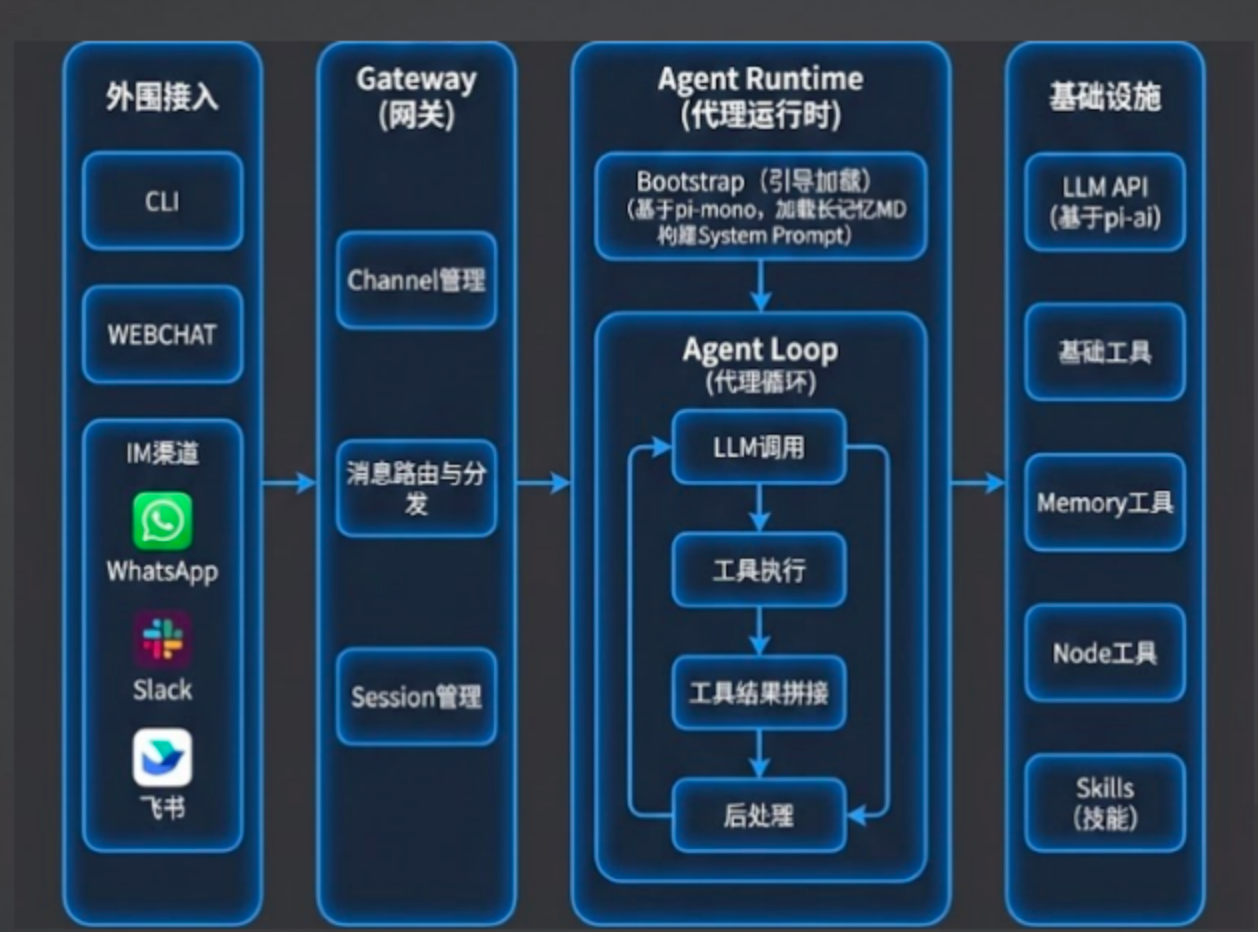
OpenClaw 的外围就是各种 IM 软件。除了 IM 软件,还有两个项目本身提供的东西:一个是 Client 端,也就是命令行的控制端; 另一个是 WebChat,它提供了一个小网页,大家可以通过网页端对话使用。这些都是外围的东西。 整体上,OpenClaw 的所有东西都放在一个叫 Gateway 的进程里,这个进程是一个 Node 服务。
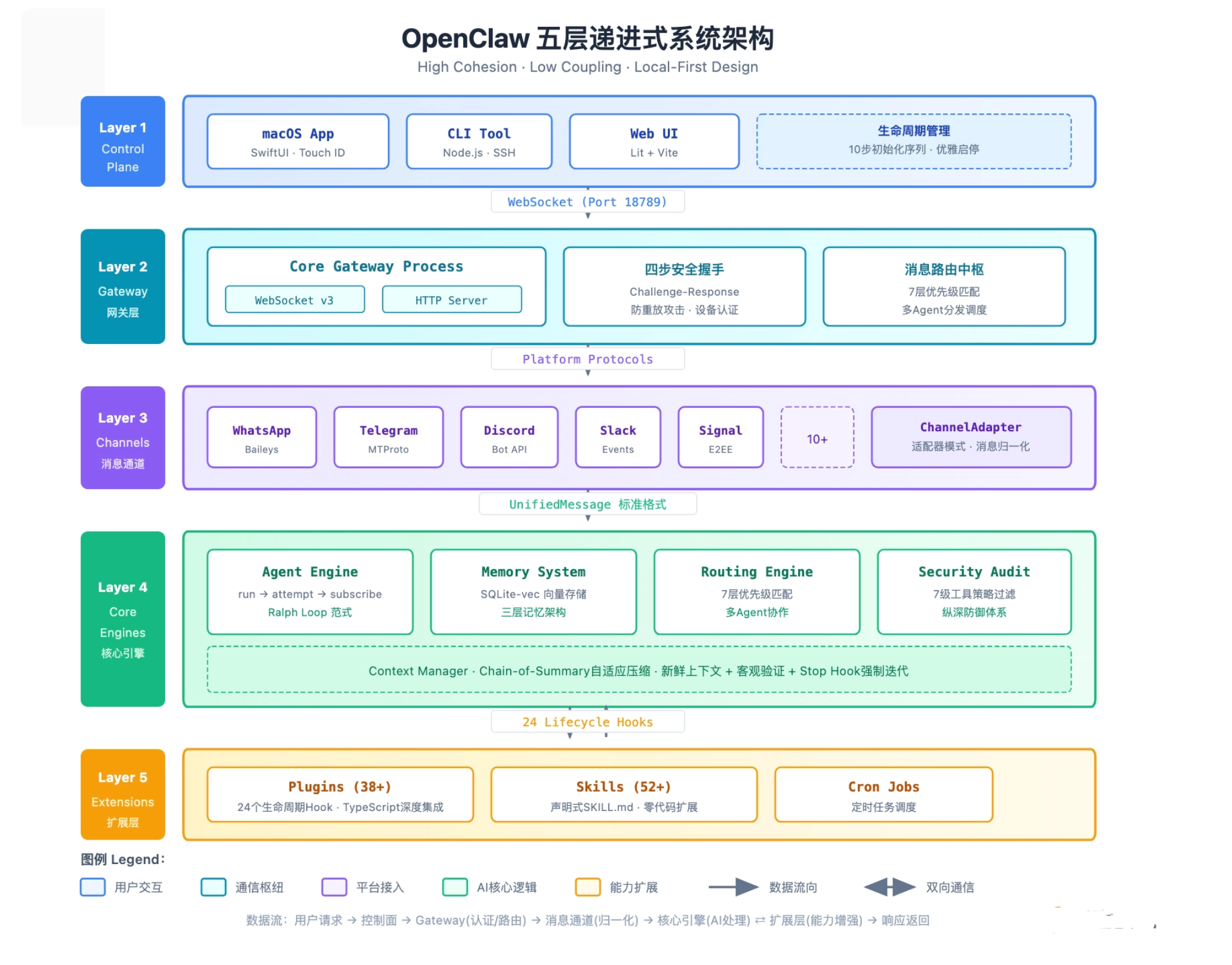
控制面(Control Plane):用户与系统的接触点
控制面只负责“展示”和“指令下发”,不承担任何业务逻
控制面还承担着系统生命周期管理的重任。OpenClaw 设计了一套精细的 10 步初始化序列,确保系统各模块按依赖关系正确就绪:
- Step 1:加载配置文件 (config.yaml)
- Step 2:初始化日志系统 (Winston/Pino)
- Step 3:建立数据库连接 (SQLite)
- Step 4:加载安全策略 (Policy Engine)
- Step 5:初始化 Memory 向量索引 (SQLite-vec)
- Step 6:注册核心 Agent 实例
- Step 7:加载 Plugins (38+ 官方扩展)
- Step 8:解析 Skills (52+ 内置技能)
- Step 9:启动 Gateway 监听 (Port 18789)
- Step 10:激活消息通道 (WhatsApp/Telegram/…
Gateway 网关层:系统的“交通枢纽”
https://docs.openclaw.ai/gateway
(⎈|sandbox:danny-xia-test)➜  Danny5487401.github.io git:(main) ✗ openclaw gateway status

🦞 OpenClaw 2026.3.24 (cff6dc9) — The lobster in your shell. 🦞

│
◇
Service: LaunchAgent (loaded)
File logs: /tmp/openclaw/openclaw-2026-03-31.log
Command: /Users/python/.nvm/versions/node/v22.21.1/bin/node /Users/python/.nvm/versions/node/v22.21.1/lib/node_modules/openclaw/dist/index.js gateway --port 18789
Service file: ~/Library/LaunchAgents/ai.openclaw.gateway.plist
Service env: OPENCLAW_GATEWAY_PORT=18789

Service config looks out of date or non-standard.
Service config issue: Gateway service PATH includes version managers or package managers; recommend a minimal PATH. (/Users/python/.nvm/versions/node/v22.21.1/bin)
Service config issue: Gateway service uses Node from a version manager; it can break after upgrades. (/Users/python/.nvm/versions/node/v22.21.1/bin/node)
Recommendation: run "openclaw doctor" (or "openclaw doctor --repair").
Config (cli): ~/.openclaw/openclaw.json
Config (service): ~/.openclaw/openclaw.json

Gateway: bind=loopback (127.0.0.1), port=18789 (service args)
Probe target: ws://127.0.0.1:18789
Dashboard: http://127.0.0.1:18789/
Probe note: Loopback-only gateway; only local clients can connect.

Runtime: running (pid 90560, state active)
RPC probe: ok

Listening: 127.0.0.1:18789
Troubles: run openclaw status
Troubleshooting: https://docs.openclaw.ai/troubleshooting
Gateway 采用 JSON over WebSocket 协议,监听在 18789 端口。 为什么选择 WebSocket 而不是 HTTP?因为 Agent 系统需要处理大量的双向实时通信——用户发送消息、Agent 流式回复、工具执行结果返回、状态更新推送,这些场景下长连接的效率远高于短连接的 HTTP 轮询.
当一条消息进入系统,Gateway 会根据 7 层优先级匹配规则,决定将消息分发给哪个 Agent 处理
消息通道层(Message Channels):连接异构世界的桥梁
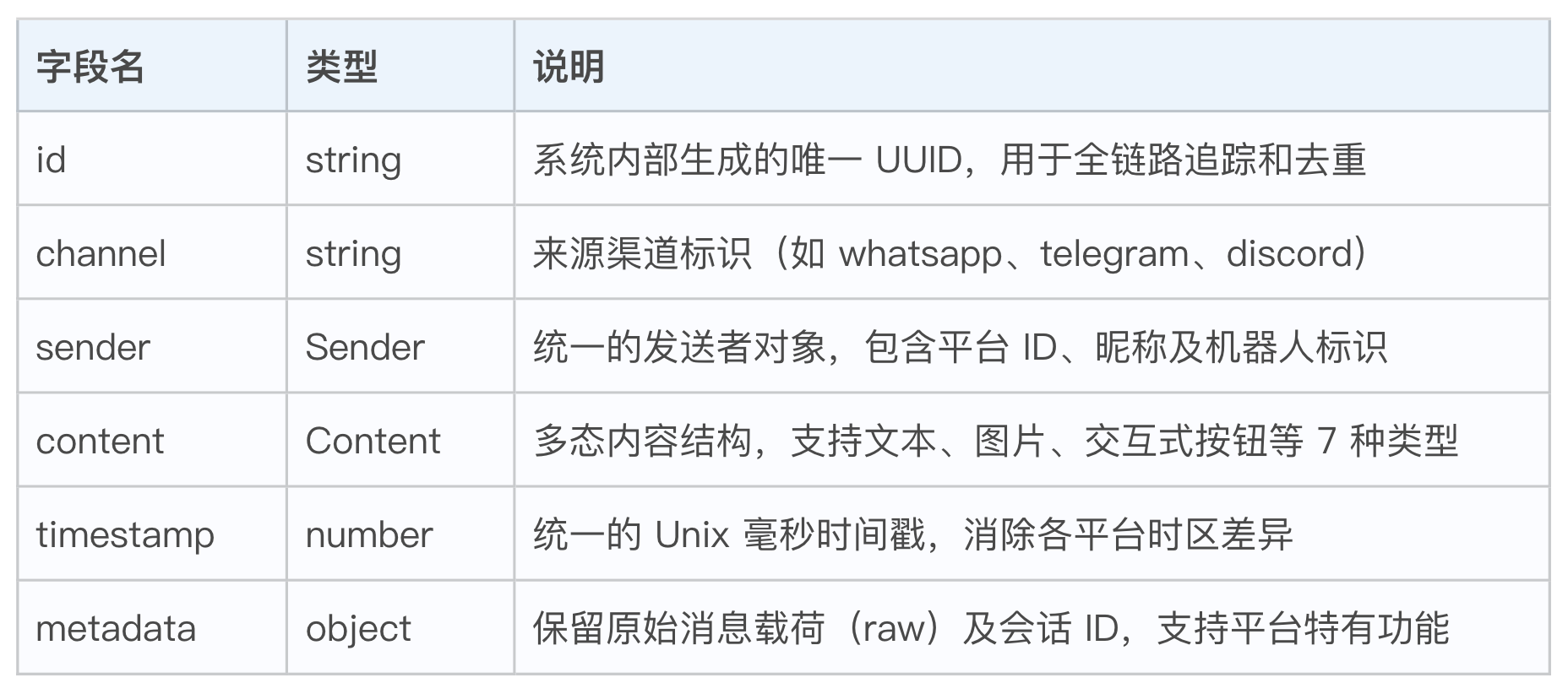
在 OpenClaw 中,所有的外部交互最终都会被封装为 UnifiedMessage 对象。它不仅包含消息文本,还承载了发送者身份、媒体附件以及复杂的元数据。
(⎈|sandbox:danny-xia-test)➜  Danny5487401.github.io git:(main) ✗ openclaw channels list

🦞 OpenClaw 2026.3.24 (cff6dc9) — Half butler, half debugger, full crustacean.

Chat channels:
- Feishu default: configured, enabled
核心引擎层(Core Engines):智能的“心脏”
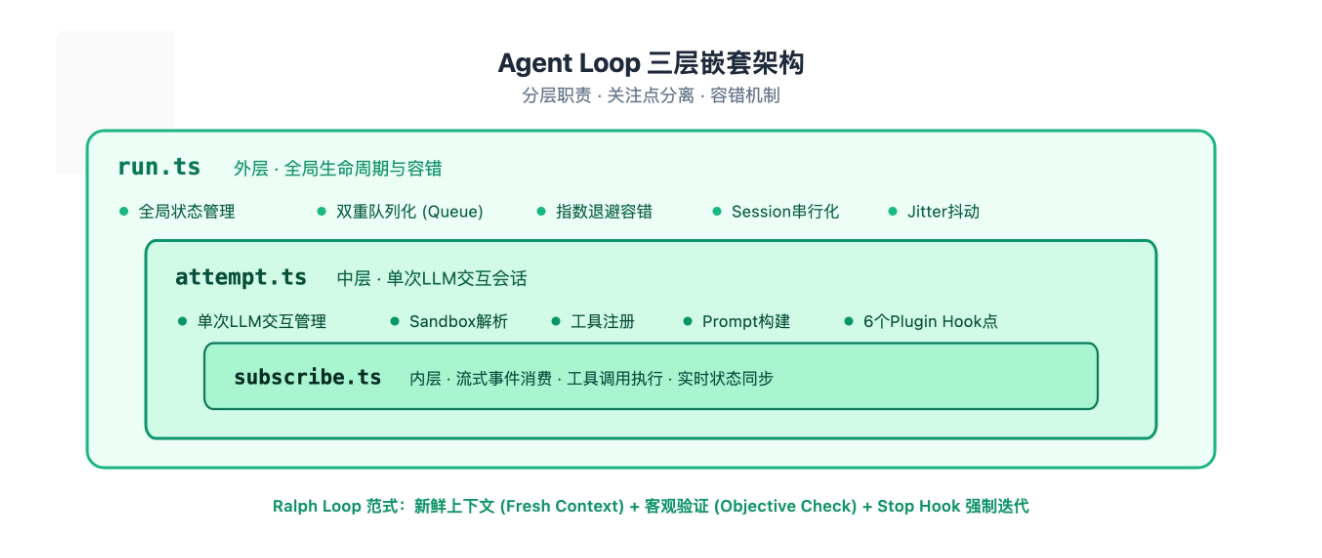
- AgentLoop:三层嵌套的执行引擎 ,这三层各司其职:
- run.ts(外层):负责全局生命周期管理,包括双重队列化、指数退避容错、Session 串行化和 Jitter 抖动。当 Agent 调用失败时,外层会根据错误类型决定是重试还是放弃。
- attempt.ts(中层):管理单次 LLM 交互会话,包括 Sandbox 解析、工具注册、Prompt 构建,以及 6 个关键的 Plugin Hook 点(如 before_llm、after_tool 等)。
- subscribe.ts(内层):处理流式事件消费、工具调用执行和实时状态同步,确保每一个 token 都能被正确处理。
- RalphLoop 范式:三原则驱动的智能迭代
OpenClaw 的 Agent Loop 实现了一套被称为 Ralph Loop 的范式,它包含三个核心原则:
- 新鲜上下文(Fresh Context):每轮迭代都重新构建上下文,避免历史信息的累积污染。
- 客观验证(Objective Check):引入外部工具来验证 LLM 的输出,而非盲目信任。
- Stop Hook 强制迭代:通过 Hook 机制强制 Agent 在必要时停止,避免无限循环
- 其他核心子系统
| 子系统 | 职责 | 关键技术 |
|---|---|---|
| Memory System | 向量记忆存储与检索 | SQLite-vec、三层记忆架构 |
| Routing Engine | 消息路由与多 Agent 协作 | 7 层优先级匹配 |
| Security Audit | 安全审计与工具策略 | 7 级过滤体系、纵深防御 |
| Context Manager | 上下文管理与压缩 | Chain-of-Summary 自适应压缩 |
OpenClaw 的核心技术
1. 上下文工程
(1)system prompt 动态加载
node@danny-agent-0:/app$ ls ~/.openclaw/workspace/
AGENTS.md			      ARGOCD_RBAC_GUIDE.md  IDENTITY.md  argocd-rbac-cm-with-project-groups.yaml  gitlab-monitor.pid	   keycloak-list-realms.js  node_modules	     setup-argocd-groups-http.js
ARGOCD_GITLAB_PROJECT_PERMISSIONS.md  BOOTSTRAP.md	    SOUL.md	 argocd-rbac-cm.yaml			  gitlab-pr-monitor-v2.py  kubeconfig.yaml	    package-lock.json	     setup-argocd-groups-simple.js
ARGOCD_HYBRID_RBAC_COMPLETE_GUIDE.md  ENVIRONMENT.md	    TOOLS.md	 argocd-rbac-design.js			  gitlab-pr-monitor.sh	   mcp-servers.json	    package.json	     setup-argocd-groups.js
ARGOCD_RBAC_DESIGN.md		      HEARTBEAT.md	    USER.md	 gitlab-monitor.log			  gitlab-pr-state.json	   netbird-deployment.yaml  remove-auditor-group.js  start-gitlab-monitor.sh
https://docs.openclaw.ai/concepts/agent-workspace#workspace-file-map-what-each-file-means
- soul.md
- identity.md
- user.md
- agent.md
- tools.md
(2)上下文的剪裁和压缩
(3)长记忆搜索
双层的长记忆机制,第一层是 memory.md,第二层是一个系统内置的 memory search 工具.
2. 后台任务:双调度机制
Cron Tab
OpenClaw 自己维护一个 cron.json 文件,记录需要精确调度的任务
Heartbeat 机制
heartbeat 每 30 分钟无脑唤醒一次,让 agent 做点事情。
3. 工具调用与 Skills 渐进式披露
如果把这些全部塞进一个 SKILL.md,会有两个问题。
- token 爆炸:每次激活都要加载几千 tokens。
- 信息噪声:用户问“收入增长率怎么算”,Claude 却要阅读关于成本分析、现金流、资产负债表的全部内容。
渐进式披露(Progressive Disclosure,也即是渐进式的加载):https://agentskills.io/specification#progressive-disclosure
- metadata: name 和 description
- 指导: skill.md 当sklll 激活
- 资源: script/references/assets
skill 格式: https://docs.openclaw.ai/clawhub/skill-format
---
name: todoist-cli
description: Manage Todoist tasks, projects, and labels from the command line.
version: 1.2.0
metadata:
  openclaw:
    requires:
      env:
        - TODOIST_API_KEY
      bins:
        - curl
    primaryEnv: TODOIST_API_KEY
    envVars:
      - name: TODOIST_API_KEY
        required: true
        description: Todoist API token.
      - name: TODOIST_PROJECT_ID
        required: false
        description: Optional default project ID.
    emoji: "\u2705"
    homepage: https://github.com/example/todoist-cli
---
openclaw 部署
方式一: 官方脚本 https://docs.openclaw.ai/install
curl -fsSL https://openclaw.ai/install.sh | bash
方式二: 社区 k8s operator: https://github.com/openclaw-rocks/k8s-operator
model 配置
使用 火山云: https://docs.openclaw.ai/providers/volcengine
使用 openai oauth: https://docs.openclaw.ai/providers/openai
# 使用 oauth
$ openclaw models auth login --provider openai-codex --set-default

🦞 OpenClaw 2026.3.13 (61d171a) — Your config is valid, your assumptions are not.

◇  OpenAI Codex OAuth ─────────────────────────────────────────────╮
│                                                                  │
│  Browser will open for OpenAI authentication.                    │
│  If the callback doesn't auto-complete, paste the redirect URL.  │
│  OpenAI OAuth uses localhost:1455 for the callback.              │
│                                                                  │
├──────────────────────────────────────────────────────────────────╯
│
Open: https://auth.openai.com/oauth/authorize?response_type=code&client_id=app_EMoamEEZ73f0CkXaXp7hrann&redirect_uri=http%3A%2F%2Flocalhost%3A1455%2Fauth%2Fcallback&scope=openid+profile+email+offline_access&code_challenge=DJf8h6w7kldKJSsoxhIrJ9tLs9LPkRQfocdXsPBrfAk&code_challenge_method=S256&state=bb07acd67d3734de1c8f0583ebed5c01&id_token_add_organizations=true&codex_cli_simplified_flow=true&originator=pi
◇  OpenAI OAuth complete
Config overwrite: /Users/python/.openclaw/openclaw.json (sha256 cf3dbd339db5a9724cf72957cad232ef3ba6283f85fd3442ff6927b7f53236d7 -> 242f4de8abe01aafcbffe9ca598386fd0db3fbeb3cf45999a3ddb5bfcf036aea, backup=/Users/python/.openclaw/openclaw.json.bak)
Updated ~/.openclaw/openclaw.json
Auth profile: openai-codex:default (openai-codex/oauth)
Default model set to openai-codex/gpt-5.4
channel 配置
使用飞书: https://docs.openclaw.ai/channels/feishu
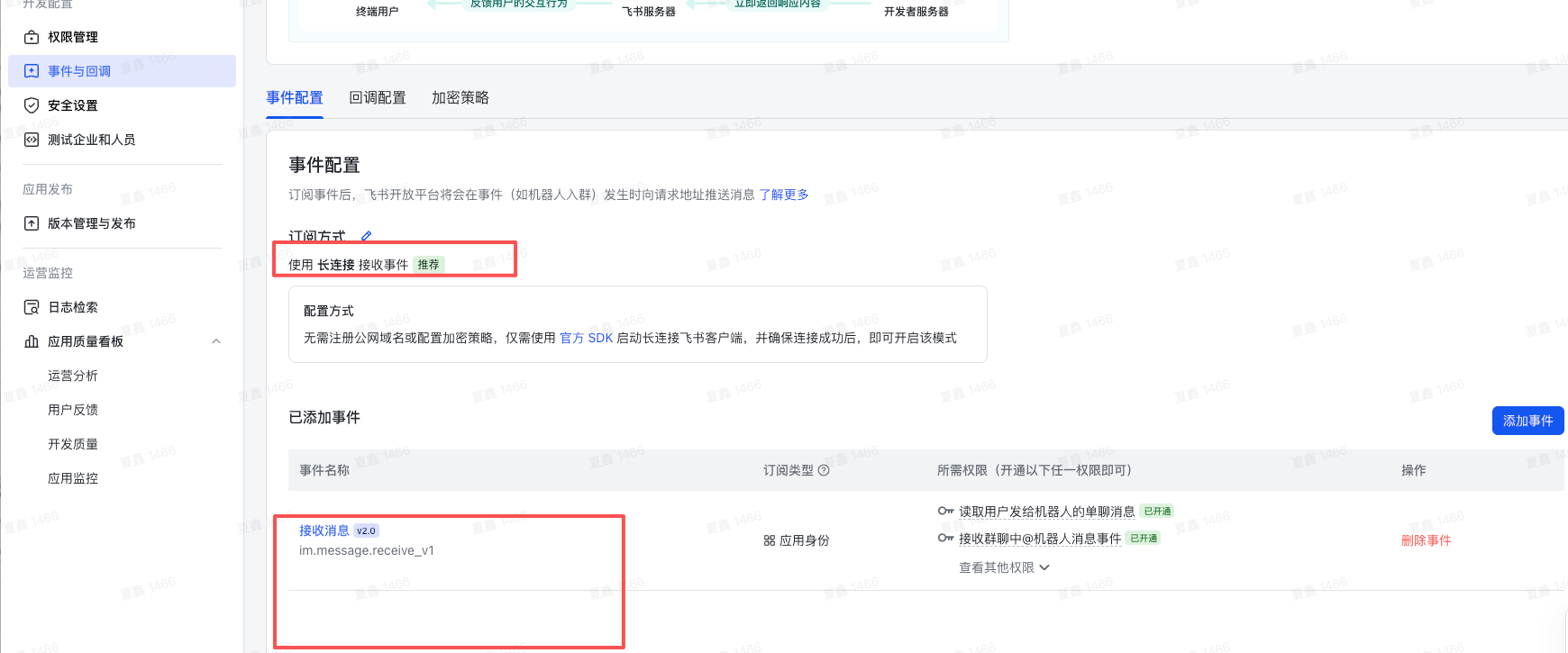
- 使用长链接:可以不用无需注册公网域名
- 添加事件: im.message.receive_v1
agent
agent workspace
https://docs.openclaw.ai/concepts/agent-workspace workspace 是agent 的家目录.
agent memory
https://docs.openclaw.ai/concepts/memory
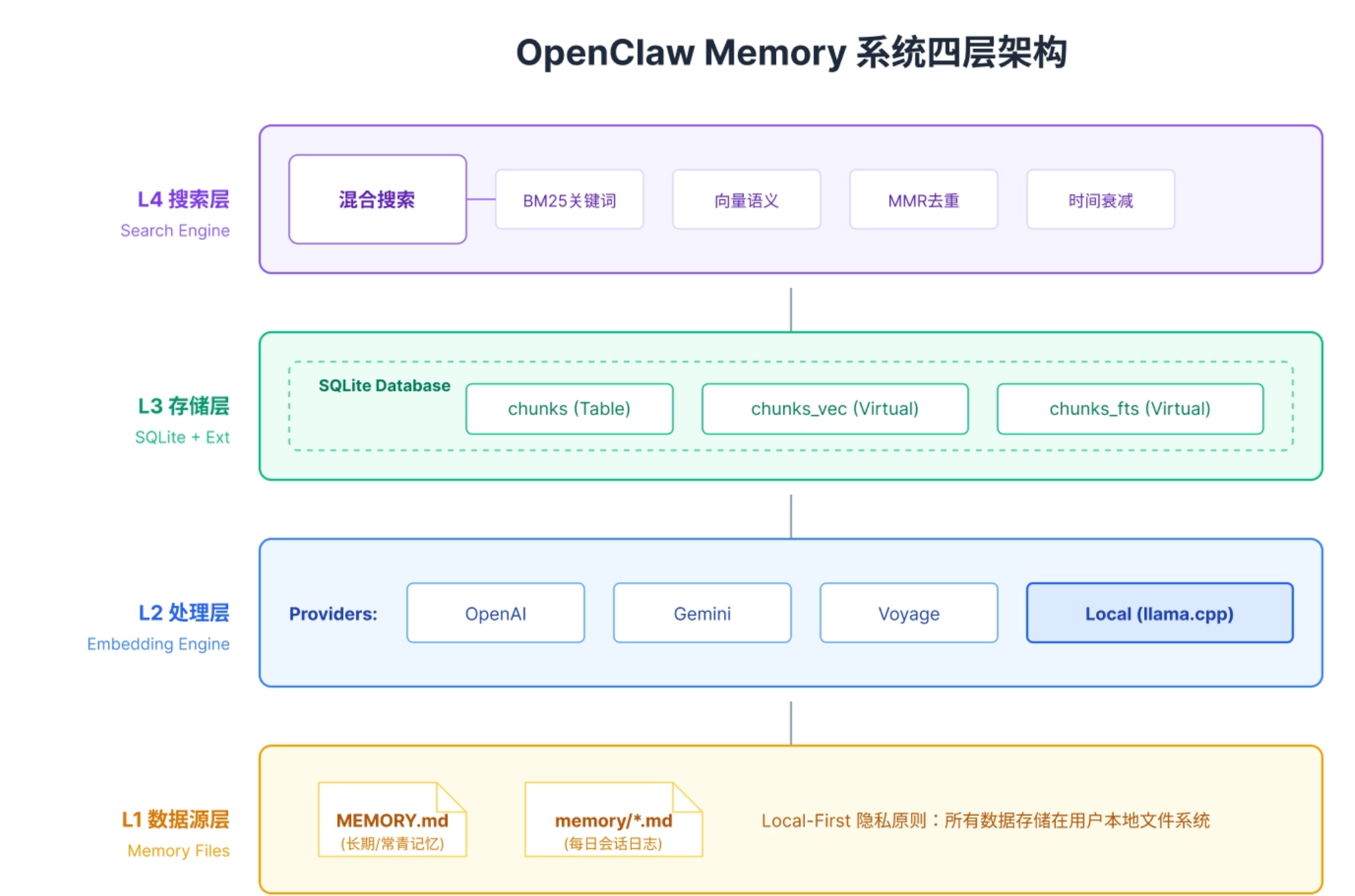
L1 数据源层
Memory 系统的原始数据来自两类 Markdown 文件:
- MEMORY.md:长期记忆文件,存放用户手动维护的重要信息,如项目背景、技术栈偏好、团队成员信息。这类记忆被标记为“常青记忆”,不受时间衰减影响。
- memory/YYYY-MM-DD.md:每日会话日志,由 Memory Flush 机制自动生成。每次会话中值得记住的信息会被追加到当天的文件中
L2 处理层:文本如何变成向量
将文本转换为高维向量(Embedding)
L3 存储层:数据怎么持久化
memory-core 默认存储
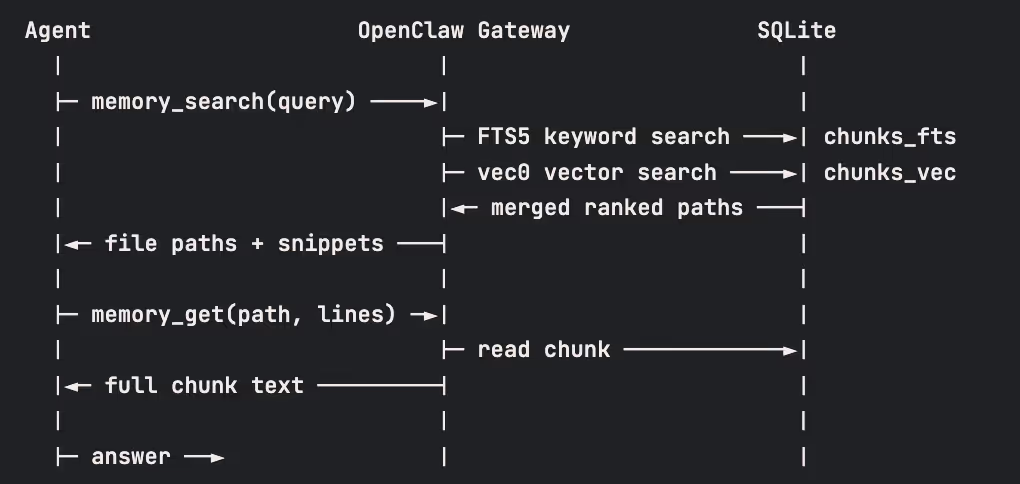
SQLite-vec:Local-First 的向量存储选择 SQLite-vec 而非 Pinecone 或 Milvus,体现了 OpenClaw 的 Local-First 哲学。 所有数据都存储在本地,用户拥有完全的数据主权。SQLite 的单文件部署特性,也让整个系统的安装和迁移变得极其简单——只需要复制一个.db 文件
OpenClaw 选择 SQLite 作为存储引擎,配合两个关键扩展:
- sqlite-vec:向量搜索扩展,支持余弦相似度计算,实现高效的 ANN(近似最近邻)检索。
- FTS5:SQLite 内置的全文搜索引擎,支持 BM25(Best Matching 25) 排序算法。
memory设置: https://docs.openclaw.ai/reference/memory-config
# 默认使用sqlite
node@danny-agent-0:/app$ openclaw memory status --deep

🦞 OpenClaw 2026.3.24 (cff6dc9) — Pairing codes exist because even bots believe in consent—and good security hygiene.

Memory Search (main)
Provider: none (requested: auto)
Model: none
Sources: memory
Indexed: 0/1 files · 0 chunks
Dirty: yes
Store: ~/.openclaw/memory/main.sqlite
Workspace: ~/.openclaw/workspace
Embeddings: unavailable
Embeddings error: No API key found for provider "openai". You are authenticated with OpenAI Codex OAuth. Use openai-codex/gpt-5.4 (OAuth) or set OPENAI_API_KEY to use openai/gpt-5.4.

No API key found for provider "google". Auth store: /Users/python/.openclaw/agents/main/agent/auth-profiles.json (agentDir: /Users/python/.openclaw/agents/main/agent). Configure auth for this agent (openclaw agents add <id>) or copy auth-profiles.json from the main agentDir.

No API key found for provider "voyage". Auth store: /Users/python/.openclaw/agents/main/agent/auth-profiles.json (agentDir: /Users/python/.openclaw/agents/main/agent). Configure auth for this agent (openclaw agents add <id>) or copy auth-profiles.json from the main agentDir.

No API key found for provider "mistral". Auth store: /Users/python/.openclaw/agents/main/agent/auth-profiles.json (agentDir: /Users/python/.openclaw/agents/main/agent). Configure auth for this agent (openclaw agents add <id>) or copy auth-profiles.json from the main agentDir.
By source:
  memory · 0/1 files · 0 chunks
Vector: unknown
FTS: ready
Embedding cache: enabled (0 entries)
Batch: disabled (failures 0/2)
L4 搜索层:检索策略的编排
搜索层是整个系统的“大脑”,负责编排复杂的检索策略:
- 混合搜索:同时执行向量搜索和关键词搜索,综合两者的优势。
- 加权合并:默认 70% 向量权重 + 30% 关键词权重。
- 时间衰减:为每条结果乘以时间衰减因子,近期记忆得分更高。
- MMR 去重:通过最大边际相关性算法,剔除高度相似的结果。
Context engine 上下文引擎
https://docs.openclaw.ai/concepts/context-engine
内置 legacy engine.
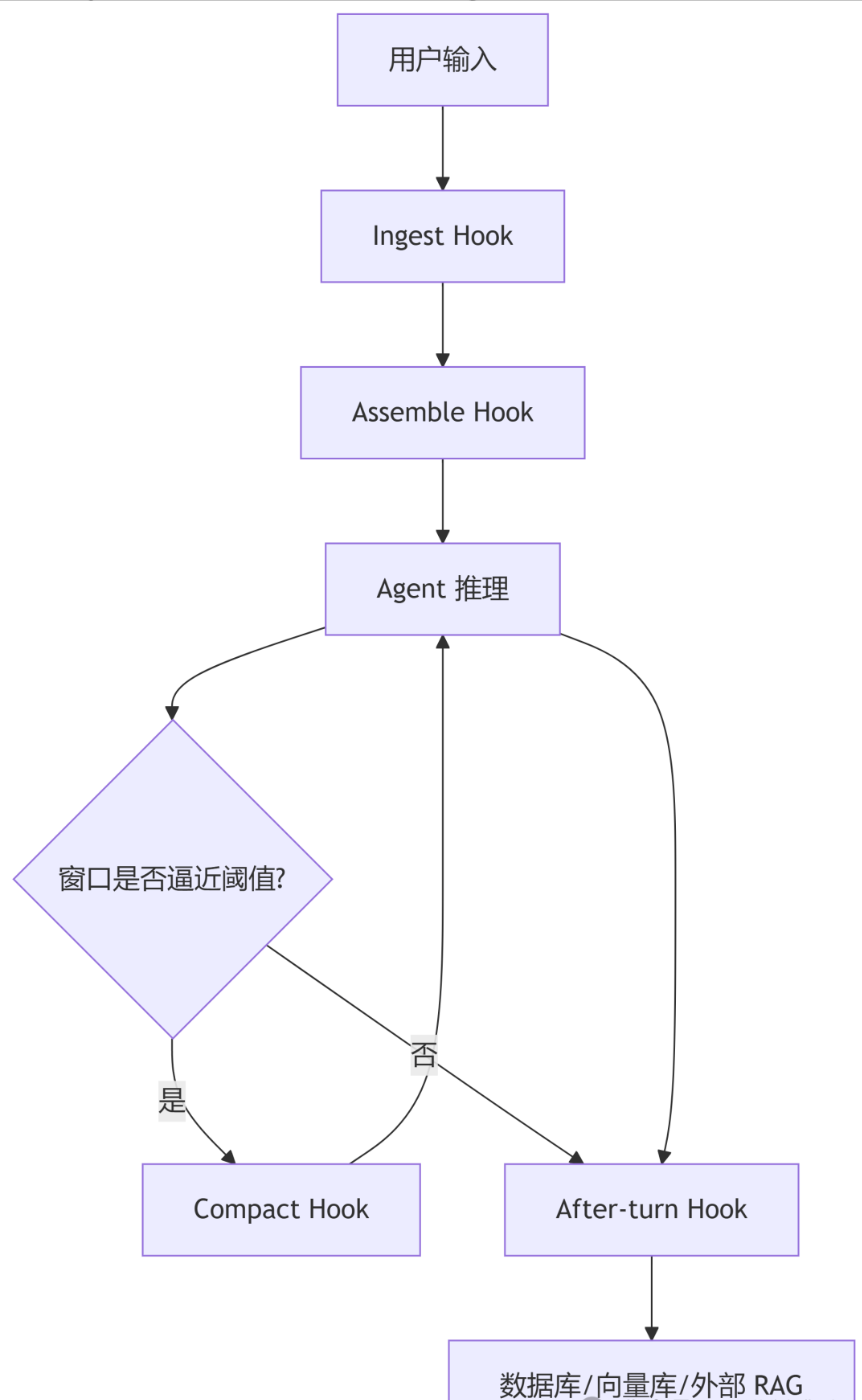
钩子
- ingest
- assemble
- compact
- after true
第三方 Context engine plugin
- https://github.com/martian-engineering/lossless-claw
- https://github.com/volcengine/OpenViking/blob/v0.3.17/examples/openclaw-plugin/INSTALL.md
tools 和 plugins
https://docs.openclaw.ai/tools
OpenClaw 内置了文件操作、Shell 执行、网络请求、浏览器控制等多个工具组,每个工具组包含若干具体工具。
内置 tools
- 文件操作工具: read / write / edit
- Shell 执行工具: exec / process 管理后台进程
- 网络工具: web_search 网络搜索 / x_search / web_fetch 抓取网页内容
- 浏览器工具: browser
- 消息与通知工具: message / text-to-speech(tts 文本转语音)
插件 plugins
https://docs.openclaw.ai/tools/plugin#quick-start
插件是一个小型代码模块,用于在不修改 OpenClaw 核心代码的前提下,动态扩展其功能。典型用途包括:
- 注册 Tool: 提供语音通话、文件处理等新工具
- 注册 Hook
- 注册 CLI 命令
- 注册 HTTP 路由
- 注册消息渠道:(如 Microsoft Teams)
- 注册 Provider 登录: 集成自定义 AI 模型认证流程
- 注册后台服务
- 注册 Context Engine
- 独占插槽(Slots),比如 memory 或 contextEngine 上下文编排引擎
外部插件可以通过 clawhub 安装.
OpenClaw 会按顺序扫描插件来源:
- plugins.load.paths
- 工作区 .openclaw/extensions/
- 全局目录 ~/.openclaw/extensions/
- bundled extensions
Agent Client Protocol (ACP)
早期的 AI 编程助手大多以“聊天机器人”的形式存在,它们擅长回答概念性问题或生成代码片段,但在处理涉及多文件修改、复杂测试调试、全仓库重构等工程级任务时,往往显得力不从心。 为了解决这一问题,社区涌现出了一批专用的“编码 Harness”(如 Claude Code, Codex CLI 等)。 这些工具通常拥有独立的文件系统访问权限、shell 执行能力以及针对编程任务优化的提示词工程。
OpenClaw 没有采用现成的 gRPC、GraphQL 或 REST,而是基于 JSON-RPC 2.0 扩展出一套专为 AI Agent 场景定制的轻量级协议——ACP(Agent Client Protocol).
ACP 定义了一套标准的通信接口,使得 OpenClaw 能够像调用本地函数一样,启动并控制任何兼容 ACP 的外部进程. 当用户在聊天中输入“用 Codex 修复这个测试失败”时,OpenClaw 会自动识别意图,通过 ACP 后端插件(如 acpx)启动一个 Codex 实例,将其绑定到当前的对话线程中,并实时流式传输其执行结果。
何时使用 ACP
选择 ACP 的场景:
- 需要读取或修改大量本地文件。
- 需要运行复杂的 Shell 命令链或编译流程。
- 需要使用特定的外部 CLI 工具(如 git, docker, npm 的深度交互)。
- 任务需要长时间的上下文保持和迭代优化(利用持久化会话)。
- 明确要求使用特定的外部模型(如 “Use Claude Code to…")。
选择原生子代理的场景:
- 简单的问答或代码片段生成。
- 需要在严格受限的沙箱环境中运行(防止恶意代码执行)。
- 任务主要是路由、总结或协调其他代理。
- 对启动速度极其敏感的短时任务。
核心机制——线程绑定与持久化会话
绑定建立:当用户在一个线程中发起 ACP 会话请求(例如 /acp spawn codex –thread auto),OpenClaw 会启动一个 ACP 会话,并将该会话的 ID 与当前线程的 ID 关联起来,存储在会话元数据中。
消息路由:此后,该线程内产生的所有新消息,不再被视为普通的聊天输入,而是被自动路由到绑定的 ACP 会话中,作为该会话的“下一轮输入”。
输出回传:ACP 会话产生的所有输出(包括中间思考、命令执行结果、最终代码)都会以消息形式发送回同一个线程。
上下文保持:由于会话是持久的(Persistent Mode),ACP 智能体能够“记住”之前在该线程中的所有交互历史,从而实现连续的工程协作
